Blender - Rendering on the farm
Blender is supported on our Deadline render farm. The farm renders only our officially supported version
Before you submit
- Save your .blend file on our storage server. A file that isn't saved, or is saved on a local drive, can't be submitted.
- All files your scene uses (textures, HDRIs, linked libraries, caches, ...) have to be on the storage server too. Textures and sounds can also be packed into your .blend with File > External Data > Pack Resources. Linked libraries, movie clips and VDB volumes can't be packed.
- Set the output path in Output Properties to a folder on the storage server. Local drives (like C:\) don't work on the farm.
Submitting
Click Render > Submit To Deadline in the top menu bar.

Do some files in your scene point to a local path? Then you first get a list of them. Press OK to submit anyway, or close the window and fix them first.
After a few seconds the Deadline submission window opens. Most fields are already filled in for you:
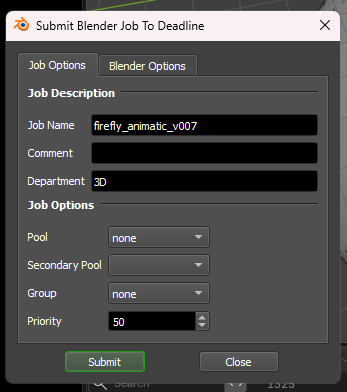
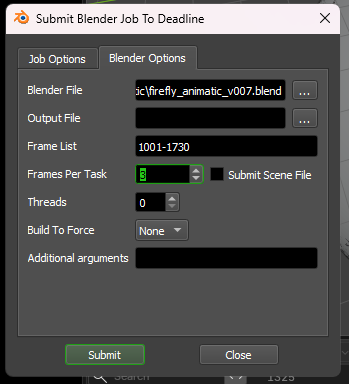
Job Options tab:
- Job Name: the name of your job in the Deadline Monitor. Filled in with your file name.
- Comment: shown in the Comment column of the Monitor. Optional.
- Pool / Group: leave these on none unless you've agreed otherwise with your render managers.
- Priority: jobs with a higher priority are picked up first when a PC is free. Don't change it unless you've agreed on a different number with your render managers.
Blender Options tab:
- Output File: leave this empty to use the output path from your .blend file.
- Frame List: the frames to render, filled in from your scene. For example 1-250, or 1,10,20 for a few test frames.
- Frames Per Task: how many frames one PC renders before it picks up the next task. 1 is fine for most renders.
- Leave the other options as they are.
Press Submit, and your job shows up in the Deadline Monitor. If something goes wrong during the render, check the job comment first; our event plugins explain there what happened.