
Blender - What's different at school?
Blender at school is mostly stock Blender, with a few additions that are all set up for you automatically. You don't have to enable anything in your preferences.
Blender is globally installed; but some people have their own versions installed. Be aware: only the official supported version will run on our farm; use other versions at your own discretion
Color management
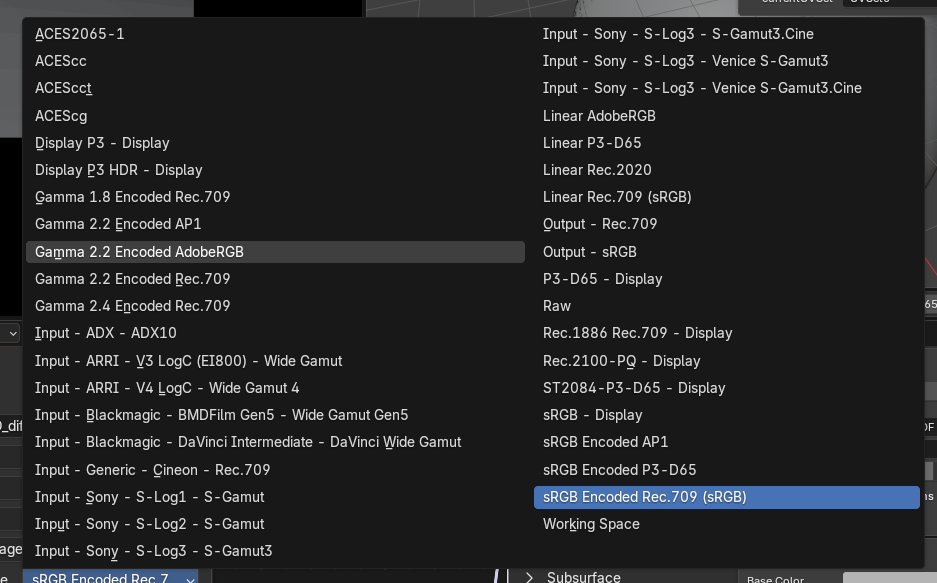
Color management is globally configured for all our applications at school, Blender included: we use an ACES 2.0 config, and Blender renders in ACEScg. Blender is a bit weird about it though: when you pick a colorspace for a texture, it shows the entire list without any categories.
Using BlenderKit? Its thumbnails are corrected automatically, so they show in the right colors.
Extra add-ons
These add-ons are always enabled:
- Submit To Deadline: rendering on our farm, see Blender - Rendering on the farm.
- Camera Shakify: adds real captured camera shake to your camera. You'll find it in the Camera properties.
- KeenTools: FaceBuilder, FaceTracker and GeoTracker. These use our license server, see Software licenses.
Default preferences
The first time you open a Blender version, a few preferences are set for you:
- Cycles renders on the GPU (OptiX) and the CPU together
- Vulkan as the display backend
- 256 undo steps
- Node Wrangler enabled
This only happens once per Blender version. If you change any of these settings yourself, they stay the way you set them.
No Comments