
Deadline - Temporarily disabling your worker
Sometimes you might not want your computer to be used for farm rendering, for example when you're caching a heavy sim or need to use it for realtime rendering engines like Unreal. In this case you can temporarily take your machine off the farm. Here's how:
First you need to open the Deadline monitor, select your worker and click on Modify Worker Properties.

There you can go to Extra Info and fill in a reason in one of these two fields, for example your name and what you're doing:
- No rendering - Until morning: for today. This field is cleared automatically every day after 9:00, so fill it in again the next day if you need your computer for longer.
- No rendering - Permanent: stays until someone removes it. Ask your render manager first before you fill this one in.
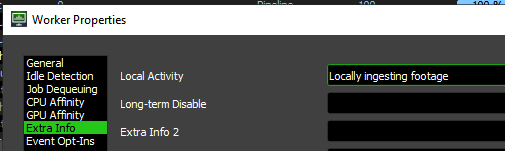
Once you've filled in a reason, your computer stops picking up new jobs within about a minute. Your worker still shows as enabled in the Monitor; that's normal.
Want your computer to render along again? Simply clear the field.
This is handled by the LocalActivityOptOut event plugin, see Deadline - Event Plugins.
No Comments